Upscale video online with AI, up to 4K
AI video enhancer and upscaler. Turn 480p or 720p footage into sharp 1080p or 4K, right in your browser. Try clips up to 30 seconds free.
- One-click AI upscaling, no software to install
- Turns low-resolution footage into sharp HD, up to 4K
- Restores detail in old, blurry or heavily compressed videos
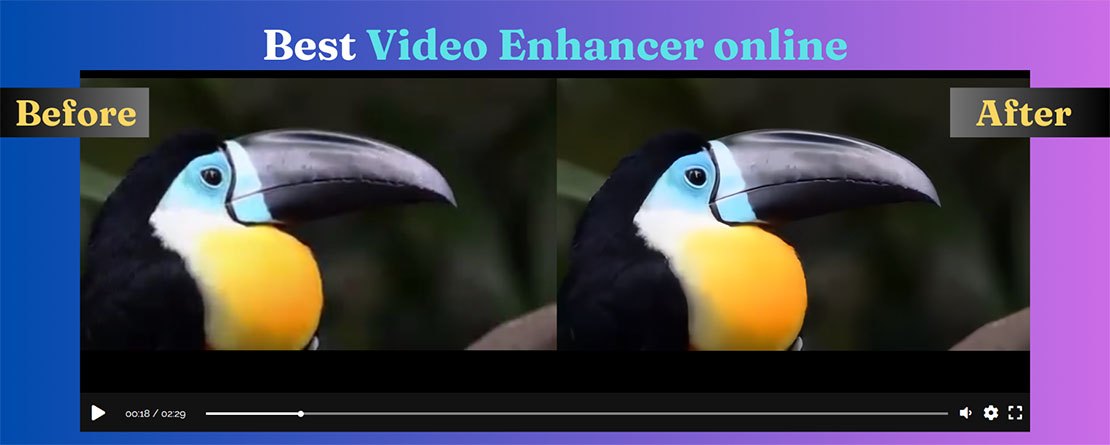
Turning a low-resolution video into a high-resolution one is called super resolution, for example from 480p to 4K Ultra HD. Our deep-learning model rebuilds the missing detail frame by frame, so you get a much clearer video at a low cost.
Up to 4x the resolution. Our AI is trained on thousands of sample videos to get the details right. Everything runs in the cloud, so you do not need a powerful computer. Upscaling takes about 10 minutes for each minute of video.
Your enhanced videos
Your enhanced videos appear below as soon as they are ready, up to 4x sharper than the original. We also email you a link.
Download your enhanced video and keep a copy. Use the blue Download button: that is the upscaled result. The small grey original link is the file you uploaded, kept for 7 days.
Your videos are private. Sign in with the same email to open them on any device.
Your privacy comes first. To protect your content, uploaded and enhanced videos are permanently deleted after 7 days. Download your enhanced video once it is ready and keep a copy of your original file.
I have successfully converted a video in 360x240 with x4, and a full HD video to 4k, the results in level of detail is actually impressive. Motion blur and weak colors stay the same. Processing time was 5 minutes for 12 seconds of full HD video so I would say that cost wise it will be hard to justify. Collecting better quality video from the beginning should probably be your first option.
How to upscale a video online
Nothing to install: it runs on our GPU servers, your computer or phone only uploads the file.
Upload the video
MP4, MOV, MKV, AVI or WebM, from a computer or a phone. Old camcorder clips, 480p downloads, screen recordings and compressed social videos all work.
Pick a mode
Default sharpens and enlarges small videos up to 4x. Face enhancer restores faces. Premium gives the best quality at 720p, 1080p or 4K.
Download the sharper video
The upscaled MP4 appears in the list under the form and we email you the link. The sound is kept as it was.
Upscale 480p and 720p video to 1080p or 4K
Upscaling (super resolution) makes a video bigger and rebuilds the detail a normal resize cannot: edges, text, hair and textures come back sharp instead of soft and blocky. The AI looks at each frame and its neighbours, so the result stays steady without flicker.
Which resolution should I choose?
480p or older (DVD, VHS, old phones) → 1080p. The biggest visible gain. Going straight to 4K adds size more than detail.
720p → 1080p or 4K. Good for YouTube uploads and big screens.
1080p → 4K. For 4K TVs and editing timelines; choose Premium 4K for the cleanest result.
What upscaling can and cannot fix
It removes compression blocks and noise, sharpens blur from low resolution and restores faces. It cannot invent what the camera never recorded: strong motion blur, a shot that is badly out of focus or very dark scenes improve only a little. Test a short clip first.
After you confirm your email. Then $0.72 per minute (Default mode), Premium $0.75 (720p), $2.50 (1080p) or $10.00 (4K) per minute. Pay once for credit, no subscription.
Video upscaler: FAQ
Can I upscale a video online for free?
Yes: clips up to 30 seconds are free in the Default mode once you confirm your email. That is enough to see the result on your own footage before paying for longer videos.
Can it upscale a video to 4K?
Yes. Premium lets you choose the output: 720p, 1080p or 4K Ultra HD. The Default mode enlarges small videos up to 4x.
What is the difference between Default and Premium?
Both use AI. Premium runs a heavier model on dedicated GPUs: finer detail, more natural faces and no flicker between frames. It is for paid accounts and is priced by output resolution.
How long does it take?
Usually a few minutes for a short clip. Longer videos and 4K take longer; the result appears in the list under the form and we send you an email when it is ready.
Which video formats can I upload?
MP4, MOV, MKV, AVI, WebM and most other video files. The result is an MP4 with the original sound.
Does it work on a phone?
Yes. Upload from the browser on iPhone or Android; the work is done on our servers, so the phone does not need to be fast.
Can I also upscale photos?
Yes, with the AI image upscaler (2x and 4x, JPG and PNG).
Are my videos private?
Yes. Only you can open your results, and uploaded and enhanced videos are deleted automatically after 7 days.
More AI video tools
·
Paying for
The minutes are added to this email. Use the same email to sign in to the website and the app.
Please enter a valid email address.
Sign in first to pay with PayPal or card right here, without typing your email.
Sign in (or create a free account) to pay with PayPal or card right here. The minutes go straight to your account.
Sign in to buy1 Your account → 2 Pay with PayPal or card
The minutes go to this account. New here? It is made in the same step, no password.
You accepted the Terms of Service and Privacy Policy before.
1 Your account → 2 Pay with PayPal or card
Enter the 6-digit code we sent to . Not there? Check the spam folder.
No code? Pay on paypal.com with your email instead.
This plan cannot be paid online from this page yet. Choose Starter, or write to us and we send you a payment link.
Finish the payment in the PayPal tab.
The minutes are added a few seconds after PayPal confirms it. Then reload this page.
Paid, thank you!
Follow your video