聞こえるすべてにリアルタイム字幕と翻訳を
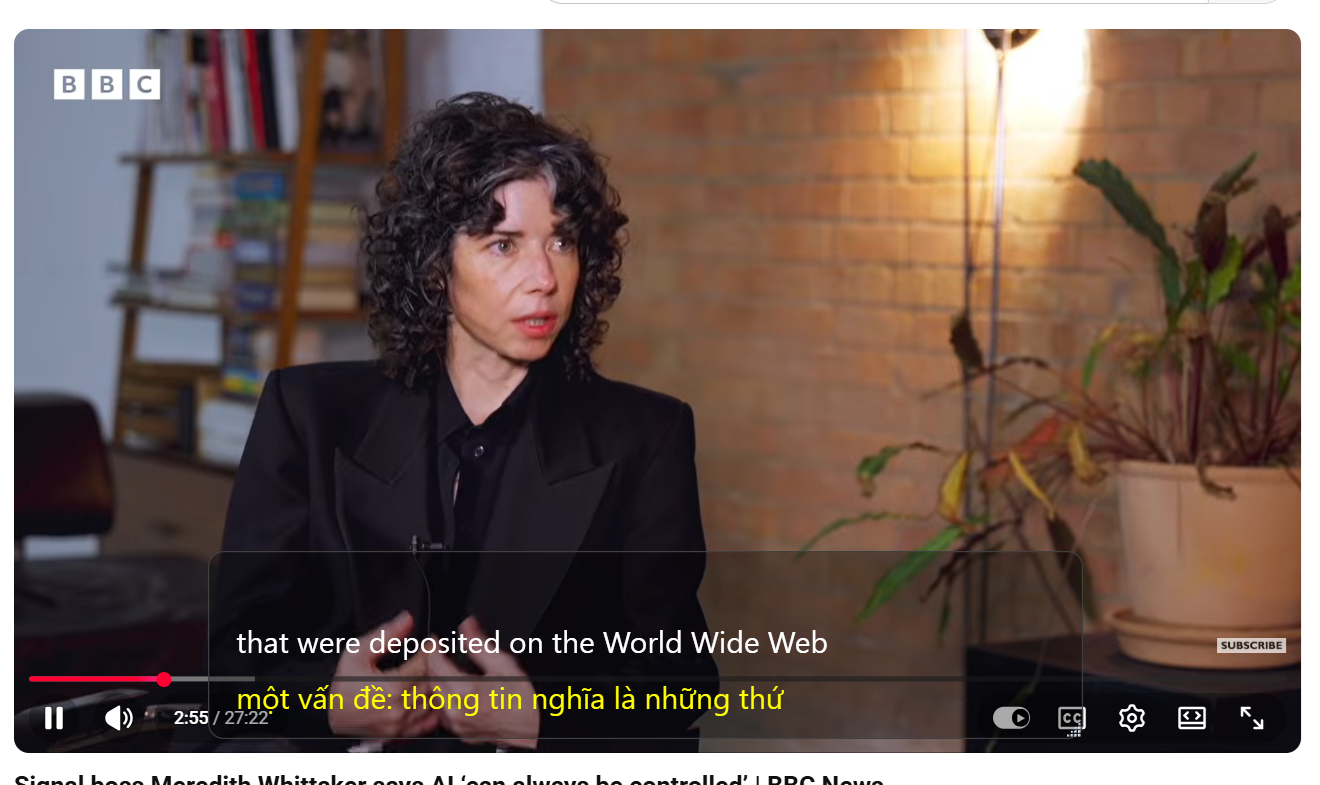
SubtitleVideo Live Caption は PC の音声をリアルタイムの字幕にし、あなたの言語に翻訳して、訳文を読み上げることもできます。会議、通話、講義、動画、ライブ配信に対応。
2 つの使い方
1 つのモードだけ、または両方を同時にオンにできます。
聞いて翻訳
Zoom、Teams、Google Meet、YouTube、ウェビナー、ゲーム配信など、PC で再生中のものに字幕を付けます。訳文を読み上げることもできます。
マイクで返答
マイクに向かって話すと、自分の言葉に字幕と翻訳が付くので、話せない言語でも返答できます。
Live Caption が選ばれる理由
一語一語を聞き取ろうと頑張らず、読みながらついていけます。
リアルタイム字幕
話している最中に、わずかな遅れで画面に表示されます。
ライブ翻訳
多言語の会議や動画を自分の言語で追えます。
読み上げ
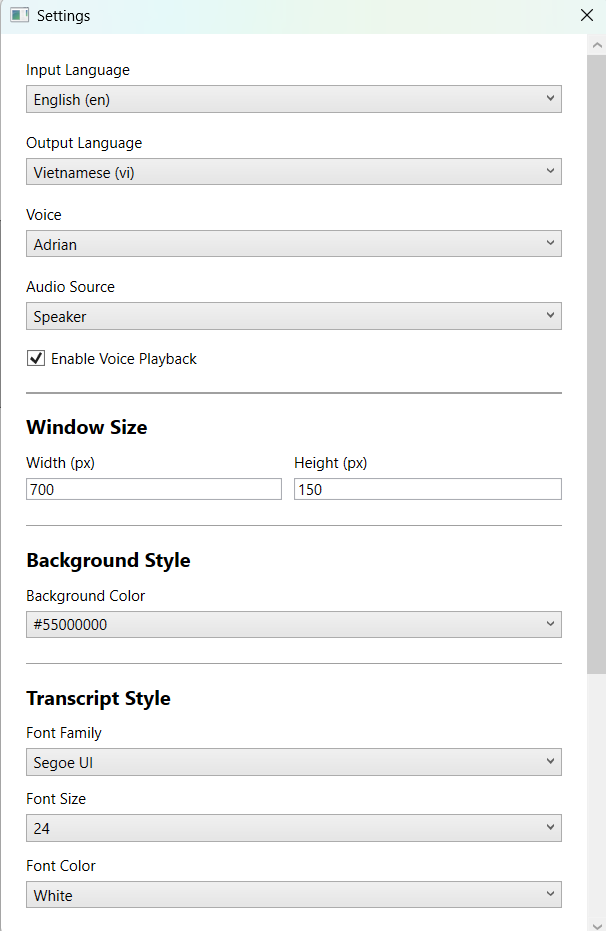
訳文を音声で聞けます。追加料金はかかりません。
アクセシビリティ
耳の聞こえない人や聞こえにくい人、読む方が好きな人に役立ちます。
どのアプリでも、どんな音でも
プラグインや会議ボットは不要。PC で再生できる音なら字幕にできます。
アカウントは 1 つ
SubtitleVideo のウェブサイトと同じメールアドレスと残り分数。
こんな用途に
3 ステップで開始
ほとんどの人が 5 分以内に字幕を使い始めています。
メールでログイン
メールアドレスと、お送りするワンタイムコードを入力してください。40 分の無料時間が待っています。
開始を押す
言語を選び、聞く・マイク・両方を選んで、読みながらどうぞ。
シンプルな料金
アプリとウェブサイトで共通の分数残高。
無料:ライブ字幕 40 分、「聞いて翻訳」「マイクで返答」「読み上げ」を含む アプリを入手
Starter
- 動画・音声 120 分
- 動画約 2 時間分です。
- ファイルの長さ無制限
- リアルタイム字幕アプリ付き
Creator
- 動画・音声 400 分
- 動画約 6.7 時間分です。
- ファイルの長さ無制限
- リアルタイム字幕アプリ付き
Pro
- 動画・音声 1,200 分
- 動画約 20 時間分です。
- ファイルの長さ無制限
- リアルタイム字幕アプリ付き
Business
- 動画・音声 4,000 分
- 動画約 66.7 時間分です。
- ファイルの長さ無制限
- チーム向け優先サポート
- 開始を押してから停止を押すまで、誰かが話しているかどうかに関係なく分数が進みます。
- 聞いて翻訳とマイクで返答は別々に数えます。両方オンにすると、10 分で 20 分を使います。
- 訳文の読み上げは「聞いて翻訳」に含まれ、追加料金はかかりません。
- 分数がなくなると、両方のモードが自動で止まります。
·
Paying for
The minutes are added to this email. Use the same email to sign in to the website and the app.
Please enter a valid email address.
Sign in first to pay with PayPal or card right here, without typing your email.
Sign in (or create a free account) to pay with PayPal or card right here. The minutes go straight to your account.
Sign in to buy1 Your account → 2 Pay with PayPal or card
The minutes go to this account. New here? It is made in the same step, no password.
You accepted the Terms of Service and Privacy Policy before.
1 Your account → 2 Pay with PayPal or card
Enter the 6-digit code we sent to . Not there? Check the spam folder.
No code? Pay on paypal.com with your email instead.
This plan cannot be paid online from this page yet. Choose Starter, or write to us and we send you a payment link.
Finish the payment in the PayPal tab.
The minutes are added a few seconds after PayPal confirms it. Then reload this page.
Paid, thank you!
Follow your videoよくある質問
どのアプリで使えますか?
PC で音を出すアプリならどれでも:Zoom、Microsoft Teams、Google Meet、Skype、ブラウザ、動画プレーヤー、ゲーム。プラグインや会議ボットは不要です。
別のアカウントが必要ですか?
いいえ。アプリは subtitlevideo.com と同じメールアドレスと分数を使います。メールアドレスとワンタイムコードでログインしてください。
支払い後に分数が追加されない場合は?
PayPal の領収書を admin@subtitlevideo.com に送っていただければ、すぐに追加します。
返金はできますか?
できません。まず無料でお試しください:結果にご満足いただけなかった場合でも、お支払いは返金されません。
足りない機能や動かない点がありますか?admin@subtitlevideo.com までご連絡ください。24 時間 365 日対応しています。
もう一言も聞き逃さない
Live Caption をインストールして 40 分の無料時間をどうぞ。クレジットカード不要。
Microsoft Store で入手