为您听到的一切提供实时字幕和翻译
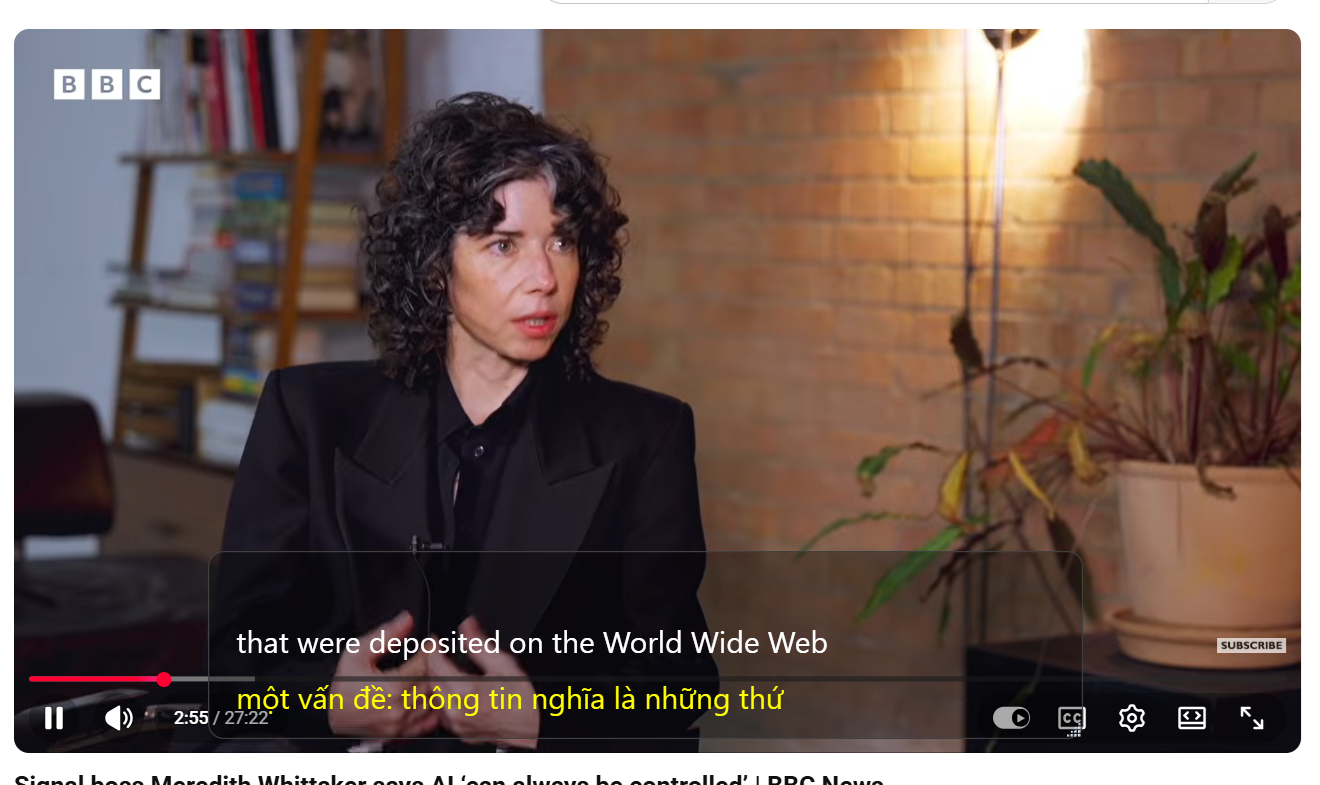
SubtitleVideo Live Caption 把电脑上的声音变成实时字幕,翻译成您的语言,还能朗读译文。适用于会议、通话、讲座、视频和直播。
两种使用方式
开启一种模式,或同时开启两种。
收听并翻译
为电脑上播放的任何内容加字幕:Zoom、Teams、Google Meet、YouTube、网络研讨会或游戏直播。译文可以为您朗读出来。
麦克风回复
对着麦克风说话,看到您的话被加上字幕并翻译,这样您可以用不会说的语言回答。
大家为什么使用 Live Caption
边看边读,不用费力去听清每个词。
实时字幕
人们说话时语音就出现在屏幕上,延迟很低。
实时翻译
用您自己的语言跟上多语言会议和视频。
朗读
听到译文朗读,不另收费。
无障碍
帮助聋人、听力障碍者或更喜欢阅读的人。
任何应用,任何声音
无需插件或会议机器人。只要电脑能播放,就能加字幕。
一个账户
与 SubtitleVideo 网站相同的邮箱和分钟。
适用场景
3 步开始
大多数人五分钟内就能用上字幕。
用邮箱登录
输入您的邮箱和我们发送的一次性验证码。40 分钟免费时长等着您。
点击“开始”
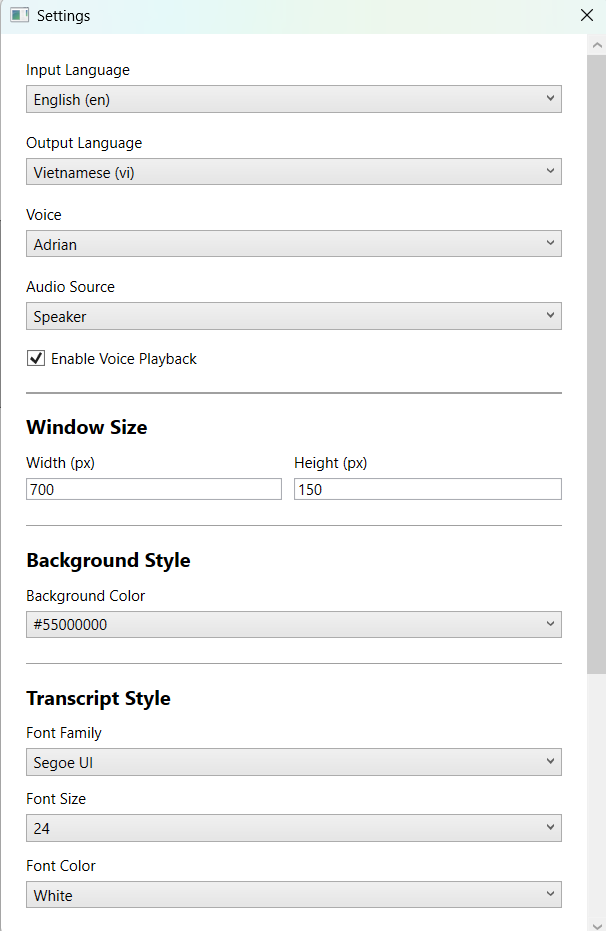
选择语言,选择“收听”“麦克风”或两者,然后边看边读。
简单透明的价格
应用和网站共用一个分钟余额。
免费:40 分钟实时字幕,包含“收听并翻译”、“麦克风回复”和“朗读” 获取应用
Starter
- 120 分钟视频或音频
- 约 2 小时视频。
- 文件时长不限
- 含实时字幕应用
Creator
- 400 分钟视频或音频
- 约 6.7 小时视频。
- 文件时长不限
- 含实时字幕应用
Pro
- 1,200 分钟视频或音频
- 约 20 小时视频。
- 文件时长不限
- 含实时字幕应用
Business
- 4,000 分钟视频或音频
- 约 66.7 小时视频。
- 文件时长不限
- 团队优先支持
- 从您按“开始”到按“停止”一直计时,无论是否有人在说话。
- 收听并翻译和麦克风回复分开计算。两者都开启时,10 分钟会消耗 20 分钟。
- “收听并翻译”中包含朗读译文,不另收费。
- 分钟用完时,两种模式都会自动停止。
·
Paying for
The minutes are added to this email. Use the same email to sign in to the website and the app.
Please enter a valid email address.
Sign in first to pay with PayPal or card right here, without typing your email.
Sign in (or create a free account) to pay with PayPal or card right here. The minutes go straight to your account.
Sign in to buy1 Your account → 2 Pay with PayPal or card
The minutes go to this account. New here? It is made in the same step, no password.
You accepted the Terms of Service and Privacy Policy before.
1 Your account → 2 Pay with PayPal or card
Enter the 6-digit code we sent to . Not there? Check the spam folder.
No code? Pay on paypal.com with your email instead.
This plan cannot be paid online from this page yet. Choose Starter, or write to us and we send you a payment link.
Finish the payment in the PayPal tab.
The minutes are added a few seconds after PayPal confirms it. Then reload this page.
Paid, thank you!
Follow your video常见问题
它支持哪些应用?
任何在电脑上播放声音的应用:Zoom、Microsoft Teams、Google Meet、Skype、浏览器、视频播放器和游戏。不需要插件或会议机器人。
需要单独的账户吗?
不需要。应用使用与 subtitlevideo.com 相同的邮箱和分钟。用邮箱和一次性验证码登录。
付款后分钟没到账怎么办?
把您的 PayPal 收据发送到 admin@subtitlevideo.com,我们会立即为您添加。
可以退款吗?
不可以。请先免费试用:如果您对结果不满意,付款不予退还。
有缺失或不能用的地方?请写信到 admin@subtitlevideo.com,我们 24/7 回复。
再也不错过一个词
安装 Live Caption,获得 40 分钟免费时长。无需信用卡。
从 Microsoft Store 获取