Free Chrome extension
Download subtitles from the video you are watching
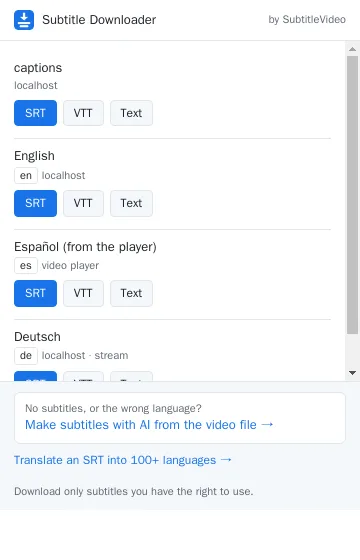
One click lists the subtitles of the video on the page – YouTube, online courses, news sites, any HTML5 player – and saves them as SRT, VTT or plain text. Free, no account, no limit.
How it works
1
Open a video
Play it for a moment. On YouTube, the list shows every language the video has, also the automatic captions.
2
Click the extension
The button shows how many subtitle tracks it found on the page.
3
Save SRT, VTT or text
The file is named after the video and opens in VLC, Premiere, CapCut, YouTube Studio or any editor.
What it can read
YouTube
Uploaded subtitles in every language and the auto-generated ones.
HTML5 video players
Subtitle tracks of the browser’s own player and of players such as Video.js, JW Player or Plyr.
Streams
Subtitles of HLS (.m3u8) and DASH (.mpd) streams, joined into one file.
Any format
WebVTT, SRT, TTML / DFXP, ASS / SSA and YouTube’s own format, all saved as clean SRT, VTT or text.
It cannot read words drawn into the picture (burned-in subtitles: use Extract hardcoded subtitles) or files that paid streaming services lock.
No subtitles, or the wrong language?
The extension links you straight to our tools.
Privacy policy of the extension
Short version: the extension sends nothing to us and keeps no history.
- What it looks at. On the page in the open tab, it notes the addresses of subtitle files (such as .vtt, .srt, .ttml, YouTube captions and the subtitle part of video streams) and the page title, to show them in its list. It does not read forms, passwords, messages or other page content.
- Where that stays. Only in your browser, in memory for that tab. It is cleared when you open another page or close the tab, and when the browser closes.
- What it downloads. Only when you press a button, it downloads that subtitle file from the site you are watching and saves it on your computer. It never downloads videos.
- What it sends to SubtitleVideo. Nothing. No account, no analytics, no tracking. If you click one of our links (Make subtitles with AI, Translate), our website opens like any website, with a tag that says the visit came from the extension.
- Permissions. “Read data on all websites” is needed to see subtitle files on whatever site you watch; “storage” holds the list for the open tab.
- Your responsibility. Download only subtitles you have the right to use (for yourself, for study, or with the owner’s permission).
- Contact. Questions: support. Our website’s own policy: privacy policy.
Questions
Is it free?
Yes. The extension is free, with no account and no limit. Our AI tools on the website (making subtitles from speech, translation) have free minutes and paid plans.
Which browsers does it work in?
Google Chrome, and browsers built on Chrome: Microsoft Edge, Brave, Opera and Vivaldi (version 111 or newer).
It found nothing on my video. Why?
Play the video and turn on subtitles (CC) in the player, then click the extension again. If the video has no subtitle track, or the words are part of the picture, there is nothing to download: make subtitles from the video file with our AI tool instead.
Can it download YouTube auto-generated captions?
Yes. They are listed as "(auto-generated)". If the download says so, turn on CC in the video once and press Download again.
Does it work on Netflix or Disney+?
No. Paid streaming services lock their files, and their terms do not allow downloading.
Does it download the video?
No, only subtitles.